
Smart Devices Offline: Restoring Your Toronto Asset
- Taylor Lyons
- 22 hours ago
- 12 min read
Your "smart" home is currently a liability if your security cameras are staring blankly at a disconnected router while you're stuck on hold with Bell or Rogers. You didn't invest in a high-density Toronto property to spend your evenings power-cycling a cheap plastic modem. It's frustrating to realize that your expensive system is only as reliable as a signal that keeps dropping. Knowing exactly what to do when smart devices go offline is the first step in transforming a glitchy house back into a stabilized, high-performing asset.
We agree that technology should serve you, not create a second job. This guide will show you how to diagnose connectivity failures, implement immediate fixes, and permanently prevent future dropouts to protect your lifestyle and property value. We are moving past the "unplug it and plug it back in" phase. You will discover the technical truth about why these disconnects happen and how to build a bulletproof network that ensures your home stays online, secure, and under your control.
Table of Contents
Why Your Smart Home Suddenly Went Dark (and Why It Matters)
A digital blackout is not just a minor inconvenience; it's a systemic failure of your property's central nervous system. When the smart lights stop responding and the thermostat goes rogue, your home stops working for you and starts working against you. Most homeowners panic in these moments, searching frantically for what to do when smart devices go offline, only to find generic advice that doesn't account for the complexity of a high-value Toronto residence. This isn't just about a "broken" bulb. It's about a breakdown in the infrastructure that manages your lifestyle.
There is a fundamental difference between a hobbyist setup and a professionally stabilized smart asset. One is a collection of gadgets prone to "glitching" whenever the wind blows; the other is a robust infrastructure designed for 100 percent uptime. If you are constantly power-cycling your router, you aren't fixing the problem. You are applying a temporary band-aid to a deep-seated network hemorrhage. To protect your property value, you must stop treating your smart home like a toy and start treating it like a sophisticated financial asset, which begins with choosing a reliable provider; you can explore Residential Internet with TekSavvy to build a foundation that matches your property's potential.
The Hidden Cost of Offline Devices
Security cameras that can't record are just expensive wall decorations. When your cameras and locks lose their "brain," your property is immediately vulnerable. Beyond safety, there is the invisible financial drain of energy waste. When an automated climate system defaults to manual mode because it lost connection, you are literally burning money on inefficient heating and cooling. Then there is the mental load. Managing technical debt in your own living room is exhausting. You didn't invest in smart technology to become its full-time IT support specialist. The friction of manual overrides creates a lifestyle deficit that most people simply don't have the time to manage.
The Difference Between a Glitch and a Network Failure
Is it one faulty device, or is your entire network collapsing? Identifying the scale of the failure is the first step toward restoration. Many Toronto homeowners believe that paying for top-tier Bell or Rogers fibre guarantees stability. It doesn't. High-speed internet is the fuel, but your local network hardware is the engine. If that engine is a cheap, ISP-provided plastic box, it will choke in a dense urban environment where 2.4GHz interference is rampant. Straight talk: most "off-the-shelf" hardware isn't built to handle the 50 or more devices required for a modern, high-density household. Understanding what to do when smart devices go offline requires looking past the modem and examining the backbone of your entire digital ecosystem.
The Technical Culprits: Why Toronto Networks Fail
Toronto is a unique technical beast. Your home network isn't just fighting your own four walls; it's fighting the signals of every neighbour within a 50-metre radius. If you're wondering what to do when smart devices go offline, you have to look at the invisible war happening in your airwaves. The density of the GTA creates a level of signal congestion that standard consumer hardware simply wasn't built to handle. You aren't just dealing with a "glitch"; you're dealing with environmental interference and hardware limitations that are specific to urban life.
The 2.4GHz Frequency War in the GTA
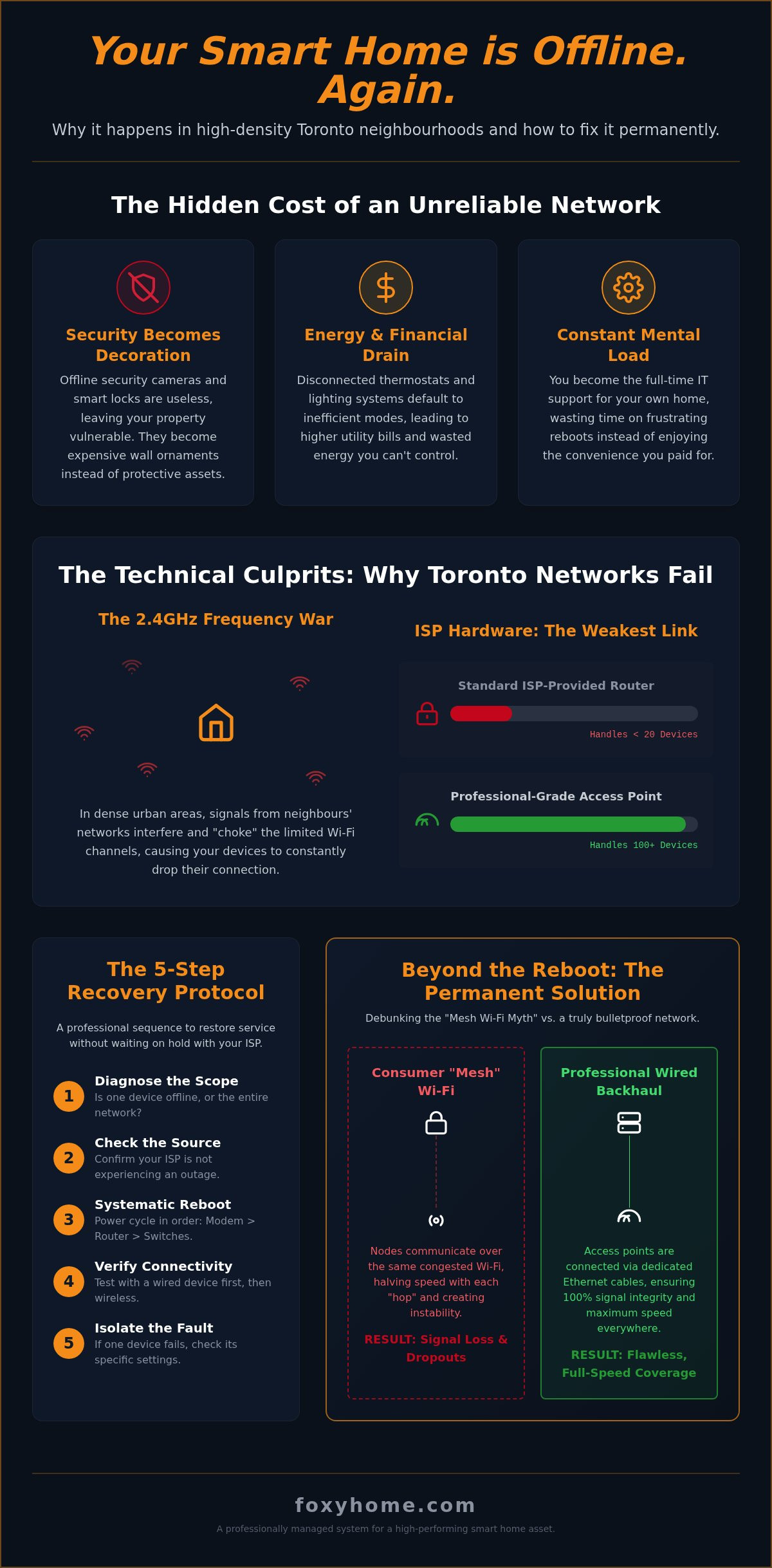
Most smart devices are built to run on the 2.4GHz band because it penetrates walls better than the faster 5GHz alternative. The problem is that every old router in a North York condo or a Leslieville semi-detached is also screaming on that same frequency. There are only three non-overlapping channels available in this band. Signal interference in Toronto is the digital equivalent of gridlock on the 401, where too many competing signals from high-density residential units choke the narrow frequency bands your devices rely on. Your neighbour’s overpowered Rogers modem is essentially sabotaging your smart lights before the signal even leaves the room.
ISP Hardware: The Weakest Link
The hardware Bell or Rogers provides is designed for "average" use, which in their minds means a couple of laptops and a Netflix stream. These boxes are not built for the 40 or 50 connections required by a modern smart asset. Most consumer-grade routers hit a "memory wall" once they manage more than 20 devices, leading to the dreaded reboot cycle where the hardware needs a "breath" every few days just to clear its cache. Professional-grade access points, unlike these all-in-one plastic shells, are dedicated machines designed to juggle hundreds of simultaneous connections without breaking a sweat.
Then there is the "musical chairs" of IP addresses, technically known as DHCP. When your router reassigns an address to your phone that your smart lock was previously using, the lock goes dark. Combine this with Toronto’s architectural hurdles, like the thick Victorian brick of Cabbagetown or the rebar-heavy concrete of a King West loft, and you have a recipe for total connectivity failure. If your current system is failing, it might be time to stabilize your network infrastructure with hardware that actually matches your property's potential. Understanding these culprits is the only way to move from temporary fixes to permanent asset protection.
Immediate Troubleshooting: The 5-Step Recovery Protocol
Stop reacting to glitches and start following a disciplined recovery protocol. When your system fails, you don't need a frantic series of random guesses; you need a logical, tiered progression to restore your property's functionality. Understanding what to do when smart devices go offline begins with isolating the failure point. Is it the provider, the hardware, or the device itself? Follow this five-step protocol to regain control without the mental load of a DIY disaster.
Step 1: Check the Source. Verify if the internet is actually reaching your home. If your wired laptop works but your smart locks don't, the issue is local.
Step 2: Power Cycle. Rebooting is a science, not a suggestion. Follow the sequence below to ensure a clean start.
Step 3: App Diagnostics. Open the native app for the offline device. Look for specific error codes that differentiate between a cloud outage and a local hardware failure.
Step 4: Signal Strength Audit. Take your smartphone to the exact location of the offline device. If your phone shows weak Wi-Fi, your device is likely starving for signal.
Step 5: IP Reservation. This is the pro-level fix. Assign a permanent IP address to your most critical devices in your router settings to stop the "musical chairs" of address conflicts.
The Proper Way to Power Cycle
Don't just yank the cord and immediately shove it back in. The "30-second rule" is vital because it allows the capacitive charge in the hardware to dissipate completely, ensuring the memory clears. The sequence of operations is non-negotiable. Turn everything off. Power up the modem first and wait for a solid connection light. Power up the router second. Only then should you power up your smart devices. Whatever you do, avoid the "Factory Reset" button at all costs. That is a nuclear option that wipes your entire configuration and forces a tedious manual reconfiguration of your asset.
Checking for Cloud and Service Outages
Sometimes the problem isn't in your house; it's in the cloud. Use sites like DownDetector to see if AWS, Google, or your device manufacturer is experiencing a widespread outage. You should also differentiate between a dead connection and a dead battery. Many smart locks and cameras go "offline" simply because their power source is depleted. A specific tip for the GTA: check for local power grid fluctuations. Toronto's aging infrastructure can cause micro-brownouts that knock sensitive smart hubs offline while your lights appear to stay on. If your internet is fine but your hub is dark, a local power surge might be the culprit.
Beyond the Reboot: Hardening Your Home Network
If you have followed the recovery protocol and you're still asking what to do when smart devices go offline every Tuesday, the problem isn't your gadgets. It's your foundation. Most Toronto homeowners treat their Wi-Fi like a utility that just "exists," but in a high-density urban environment, your network is a piece of critical infrastructure that requires stabilization. Moving beyond the reboot means stoping the cycle of reactive repairs and starting the process of hardening your network against the unique interference of the GTA.
The biggest lie sold to consumers is the "Mesh Wi-Fi" myth. Those sleek little pods from Best Buy or the ones Rogers and Bell rent to you are often a mistake for Toronto homes. These systems rely on wireless backhaul, meaning the pods talk to each other over the same congested airwaves your devices are struggling to use. It is like trying to clear a traffic jam by adding more cars to the road. In a Victorian semi-detached or a concrete-heavy condo, these wireless signals often fail to penetrate the structure, leaving you with "full bars" of a useless, disconnected signal.
Wired vs. Wireless: The Reliability Gap
The gritty industry truth is that cables still rule. FoxyHome recommends a wired backhaul for every static asset in your property. If a device doesn't move, like a security camera, a smart hub, or a television, it should be plugged into an ethernet port. This removes these "high-bandwidth" hogs from the Wi-Fi waves entirely, reducing "airtime fairness" issues. When you get your heavy lifters off the airwaves, you leave more room for the devices that actually need wireless freedom. Professional cabling is a high-ROI investment during any Toronto renovation; it stabilizes the asset and ensures your security system stays online regardless of how many neighbours install new routers.
Creating a Dedicated IoT Network
Your smart toaster does not need to be on the same network as your work laptop or your private financial data. This is where network segmentation comes in. By using a Virtual Local Area Network (VLAN), you can create a dedicated "lane" for your smart devices. This is a massive security win, as it isolates potentially vulnerable IoT devices from your personal information. More importantly for stability, segmentation prevents one "chatty" smart bulb from flooding your entire network with junk data and crashing the system. To achieve this level of control, you need to move away from consumer-grade "all-in-one" boxes and upgrade to enterprise-grade hardware like Ubiquiti. These systems are the new standard for homeowners who value their time and their property's digital integrity.
Professional Asset Management with FoxyHome
Stop acting like an unpaid IT intern in your own home. The "plug-and-play" promise of consumer electronics is a marketing lie that falls apart the moment you add more than ten devices to a standard network. If you are tired of searching for what to do when smart devices go offline, it's time to graduate from DIY frustration to professional asset stabilization. A high-density Toronto property isn't a place for gadgets; it's an environment that demands a battle-hardened, enterprise-grade infrastructure. We don't just "fix" your Wi-Fi; we design a proprietary digital backbone that treats your home connectivity as a critical financial advantage.
FoxyHome builds for the reality of 100 or more connected devices, not the ten devices your ISP-provided router expects. We manage the entire technical bureaucracy, from navigating the inefficiencies of Bell and Rogers hardware to the granular configuration of every smart hub. This "hands-off" approach ensures that the complexity is managed on your behalf, allowing you to reclaim your time. We also future-proof your asset against evolving tech standards, ensuring that as new protocols emerge, your property remains at the cutting edge of urban development.
The FoxyHome Installation Standard
Our process begins with custom network mapping to ensure optimal signal coverage in every room of your Toronto residence, regardless of whether you're dealing with century-old brick or modern rebar. We move beyond basic connectivity to create a seamless integration of lighting, security, and climate control on one stable, segmented backbone. This isn't just about convenience; it's about reliability. Our expert technicians handle the full design and configuration, providing ongoing support to ensure your asset stays stabilized as you scale your smart home ecosystem.
Protecting Your Generational Wealth
A stable, integrated smart home is a powerful tool for building generational wealth. In the competitive GTA real estate market, a property with a "bulletproof" digital infrastructure has a significantly higher perceived value than a house full of disconnected, glitchy gadgets. Moving from "tech-frustrated" to "digitally empowered" means your home works for you, protecting your security and your lifestyle without constant manual overrides. You've invested in the property; now it's time to invest in the systems that make it perform. Ready to kill the lag? Book a FoxyHome design consultation today and turn your connectivity from a liability into a strategic asset.
Take Control of Your Property's Digital Backbone
Connectivity failures in a high-density Toronto property are more than a nuisance; they are a direct threat to your security and your time. You've learned that standard ISP hardware often buckles under the pressure of a modern smart home and that "mesh" pods are rarely the answer for Toronto's architectural hurdles. While you now know what to do when smart devices go offline to get back up and running, the real solution is moving beyond reactive troubleshooting toward a stabilized, enterprise-grade infrastructure.
FoxyHome specializes in transforming these technical liabilities into strategic assets. Our professional Toronto-based technicians are integrated security and automation experts who understand how to build networks that don't fail. We deploy enterprise-grade networking solutions that manage the complexity so you don't have to. It's time to stop treating your home like a science experiment and start treating it like a high-performing financial asset.
Stop fighting your tech and start living; book your professional GTA setup with FoxyHome. Your property deserves a foundation as robust as your ambitions. Let's build a home that stays online and keeps you in control.
Frequently Asked Questions
Why do my smart devices go offline even though my Wi-Fi is working?
Your Wi-Fi signal might look strong on your phone, but your smart devices are likely suffering from IP address conflicts or signal starvation. Most "smart" gadgets operate on the crowded 2.4GHz band, which is a digital war zone in high-density Toronto neighbourhoods. Even if your internet is technically active, your router may be failing to manage the "airtime fairness" required to keep 50 different devices talking to each other simultaneously.
How do I reconnect my smart devices after a power outage in Toronto?
Sequence is everything when restoring your property's digital backbone. You must power up your modem first and wait for a solid connection light before turning on your router. Once the router is active, power up your smart hubs and individual devices. Whatever you do, don't hit the factory reset button. That nuclear option wipes your entire configuration and turns a simple reboot into a multi-hour technical debt nightmare.
Will a Wi-Fi extender fix my offline device problems?
No, Wi-Fi extenders are a band-aid that usually makes the infection worse. These cheap consumer devices often cut your bandwidth in half and create more interference by broadcasting on the same congested channels. If you are tired of wondering what to do when smart devices go offline, stop buying plastic extenders. You need a professional network design with wired access points that provide a dedicated, high-speed path back to the main router.
Does my Rogers or Bell router support a full smart home setup?
Standard-issue ISP hardware is built for basic web browsing, not for managing a sophisticated smart asset. These routers often hit a "memory wall" once you connect more than 15 or 20 devices, leading to systemic crashes and frequent disconnects. To stabilize your property and protect your lifestyle, you need enterprise-grade hardware that is engineered to handle the heavy technical load of a modern, fully integrated Toronto home.
What is the best way to prevent smart devices from disconnecting?
The only permanent solution is to harden your network foundation with enterprise-grade hardware and wired backhauls. By offloading static devices like cameras and hubs onto ethernet cables, you clear the airwaves for your truly mobile gadgets. Knowing what to do when smart devices go offline is helpful, but preventing the dropout entirely through professional network segmentation is the only way to ensure your property remains a stabilized, high-performing asset.
Can cold Toronto winters affect my outdoor smart cameras?
Extreme Canadian winters can absolutely cripple outdoor smart technology. Cold temperatures drain batteries at an accelerated rate and can cause non-rated hardware to seize up entirely during a -30°C cold snap. To protect your security, choose devices specifically designed for our climate, such as Canadian-engineered Ecobee products, and ensure your outdoor cameras have a dedicated wired power source to avoid the inevitable battery failure that comes with a February blizzard.
Is it better to use 2.4GHz or 5GHz for smart home devices?
Most smart devices are forced onto 2.4GHz because it penetrates walls better, but it is also the most congested frequency in the GTA. While 5GHz offers faster speeds and less interference, its range is significantly shorter. A professional installation solves this dilemma by using multiple access points to provide blanket 5GHz coverage, ensuring your devices stay on the "fast lane" without losing connection as you move through your home.
How many devices can a standard home router actually handle?
A typical consumer router starts to choke once you exceed 20 simultaneous connections. Between your family's phones, laptops, and a dozen smart bulbs, you have likely already surpassed that limit. Modern smart homes often require 50 to 100 individual connections to function correctly. If your hardware isn't built for that density, your system will experience a slow, frustrating collapse that no amount of rebooting can permanently fix.


Comments